 Fitiva
How do I set session prices?
Set a price per session length in Financials under Session pricing; without any price, a booking only arrives as a request.
Your prices live in Financials, in the Session pricing card. Not on your profile.
- Open Financials and find Session pricing. Press Edit.
- Add each length you offer (ready-made lengths from 15 to 180 minutes, or Custom between 5 and 480 minutes) and type its price.
- Pick the Currency.
- Press Save.
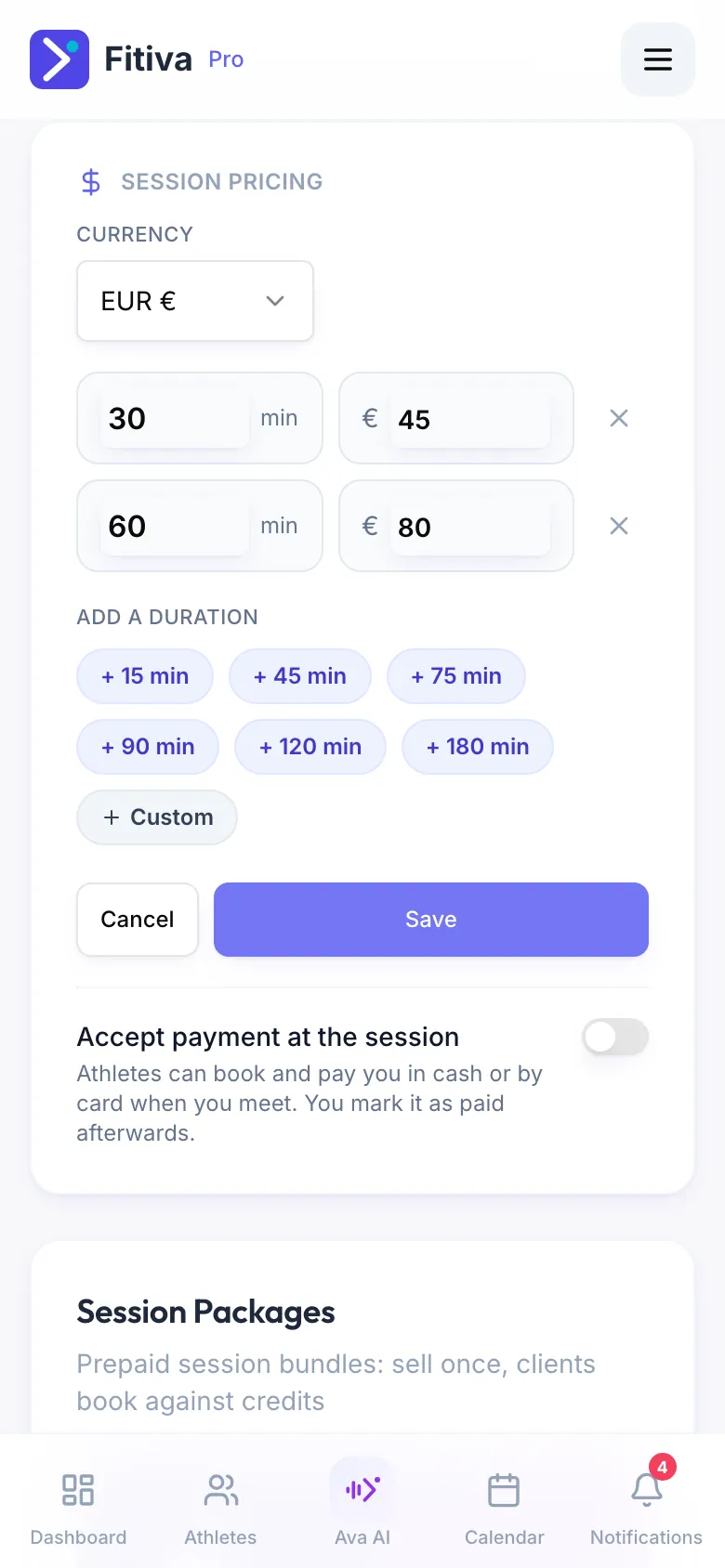
Athletes see these prices when they book and pay by card at checkout. A length without a price is not saved. If you have no price at all, athletes can still pick a time, but it arrives as a booking request (shown as "on request") that you confirm and settle yourself.
Accept payment at the session
Switch this on in the same card, and athletes can also book and pay you in cash or by card when you meet. You mark the session as paid afterwards. Fitiva takes no fee on money paid at the session, and it works without Stripe.
Also on this page
- Session Packages: prepaid bundles of sessions
- Bringing a friend: Allow a +1 and the Guest fee that a guest pays. A guest can only be added once a fee is set.
- Cancellation and refund policy: what athletes agree to before they book
On card payments, Fitiva takes your plan's platform fee (5% on Free, 2.5% on Pro, 0% on Elite) plus Stripe's card fee of 1.5% + €0.25 per payment.
Looking for something else?