 Fitiva
What can I see on an athlete's page?
An athlete's page has a header with Assign Plan and nine tabs, from Overview and Billing to Check Ins and Chat.
Open Athletes and tap a name. The page has a header and nine tabs.
The header shows the photo, name, status, email, age, height, weight and body fat, plus Edit, New Sprint and Assign Plan.
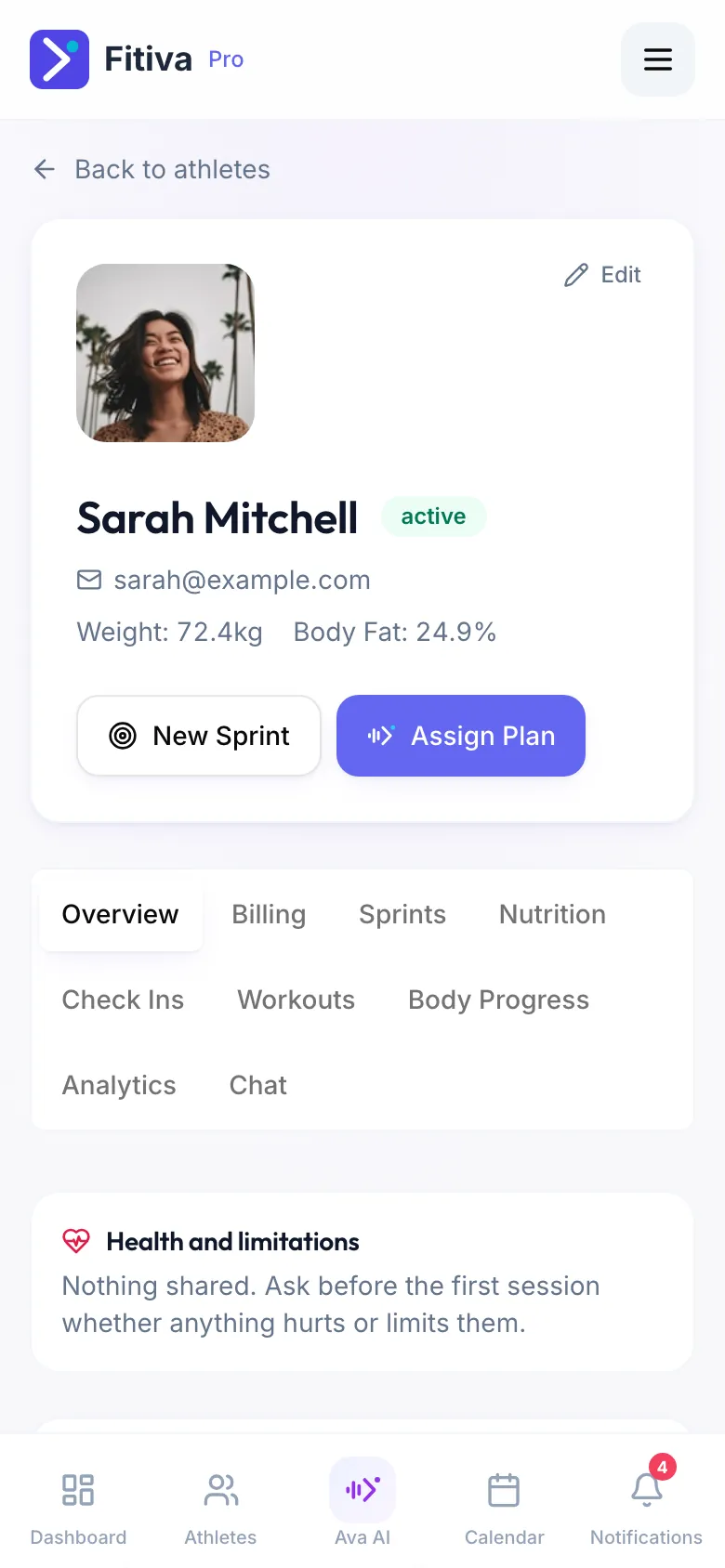
The tabs
- Overview: their Health and limitations (if they share them), Insights for the last 30 days, today's calories and workouts, active sprints and body photos, the Invite to Fitiva card until they join, Award bonus points and Assigned workouts.
- Billing: Set up subscription, Send booking link, Sell a package, their session packages and the payment history.
- Sprints: their goals with progress, and New Sprint.
- Nutrition: their goal and today, their Supplements (Add to their plan), your nutrition plan (Create Plan or Edit Plan) and what they ate, day by day.
- Check Ins: the answers to your check-in forms, and New form.
- Workouts: the workouts they logged, with ratings.
- Body Progress: weight, body fat and progress photos.
- Analytics: charts of their progress.
- Chat: your conversation with them.
Good to know
- You see what the athlete logs. Health notes only appear when they choose to share them with you.
- Someone who only books sessions with you is a guest. Their page shows a Work together offer at the top.
- Edit also holds archiving and deleting, in the Danger zone at the bottom.
Looking for something else?