 Fitiva
How do I log a personal record?
Tap Log PR under Personal Records, enter what you did and the value and save, while heavier lifts from your logged workouts are added by themselves.
Many records log themselves: when you lift a heavier weight than ever on an exercise in a logged workout, it becomes a record. Anything else, like a 5 km time or a plank hold, you log yourself.
- Open Body Progress and scroll to Personal Records. Once you have a record, the card is on your dashboard too.
- Tap Log PR.
- In New Personal Record, pick the Category: Strength, Cardio, Endurance or Skill.
- Under What did you do? enter the exercise, for example Deadlift or 5K Run.
- Enter the Value and the Unit.
- Tap Log Personal Record.
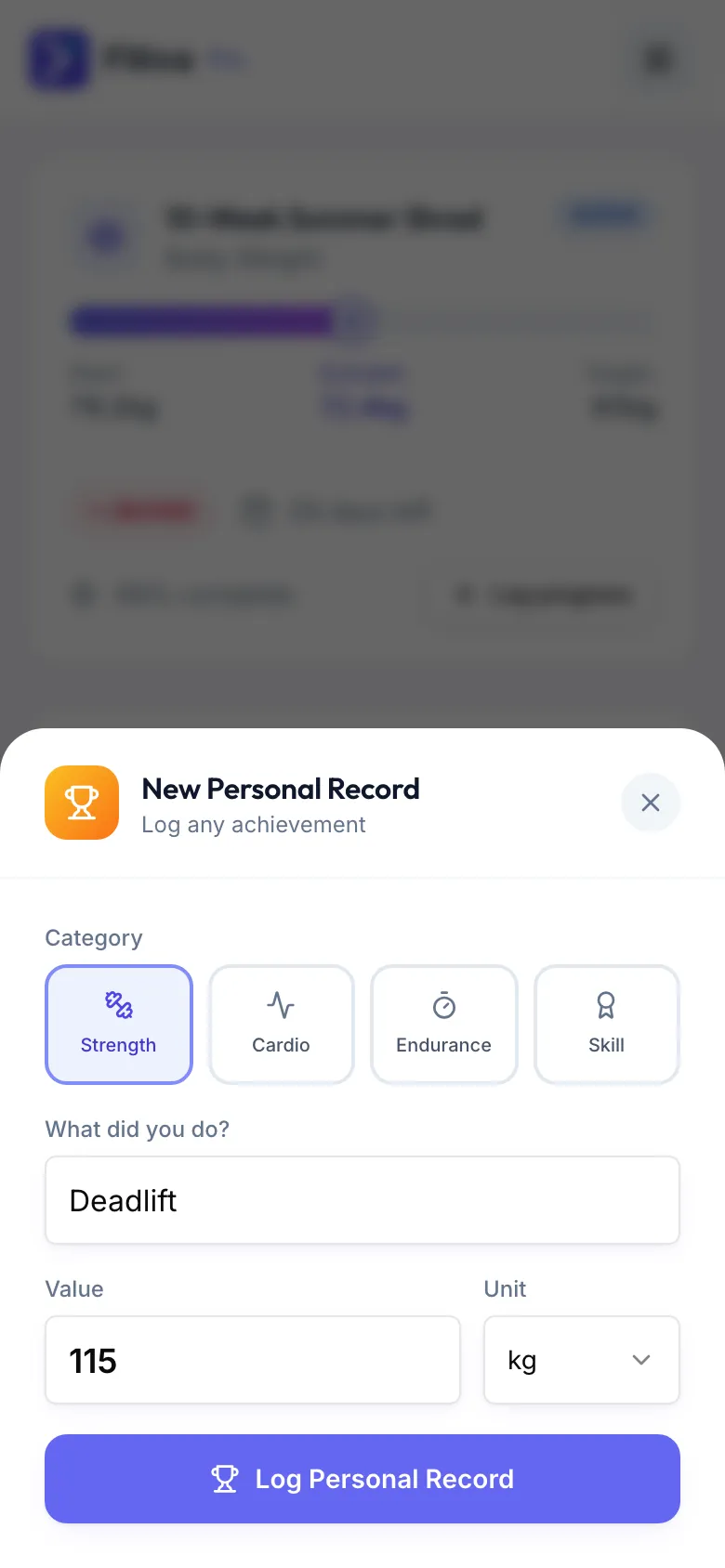
Points: each new record earns 25 points, for up to 5 records a day. After that a new record is not saved that day, and you see that tomorrow counts again.
Good to know
- One record per exercise and day.
- A strength record can move a strength goal.
- Corrected or deleted a workout? A record that came from it is corrected too. Records you logged yourself are not touched.
- Ava can log a record for you, for example "I just ran 5 km in 24 minutes".
Looking for something else?